Product Configuration: Create N-days free trial
- HostBill (Unlicensed)
- HostBill
- HostBill Support
Owned by HostBill (Unlicensed)
Last updated: May 15, 2018 by HostBill
HostBill allows you to create flexible n-days free trials. You can also automate after-trial events, like:
- sending out email that trial is over
- increasing account recurring price
- changing account billing cycle from Free to one of the available recurring billing options
This article will explain how to create sample free trial based on two scenarios using HostBill:
14-days free trial, suspend account afterwards and email client that the trial is over.
- Create or edit package in Settings → Products & Services
- Change package Price to free
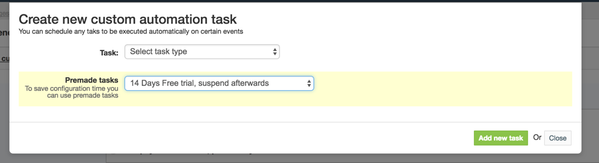
- Go to Automation tab and add new custom automation task, add premade free trial task
- The task will automatically suspend the account after the trial expires and will send email to the client. Email can be configured in Email Templates.
30-days free trial, generate invoice on 29th day
- Create or edit package in Settings → Products & Services
- Change package Price to free
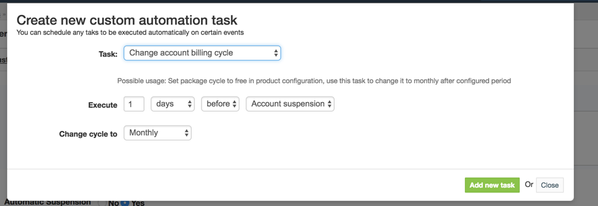
- In Automation tab add custom task: "Change account billing cycle"
In Automation tab add custom task: "Change account recurring price"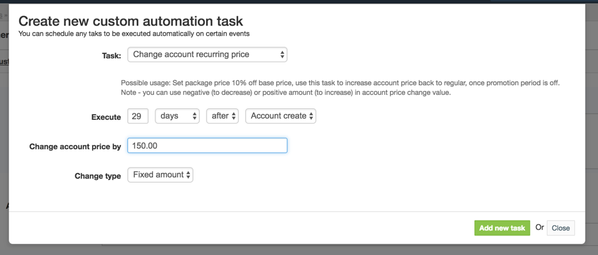
Under "Automatic suspension" set email that needs to be sent to client after suspension (i.e. "Your free trial is over"), and set auto-suspension to 1 day after due date.
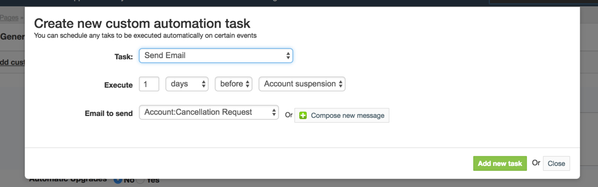
Add another custom task - Send email 30 days after account creation to inform customer that the free trial is over.
HostBill will automatically suspend the account after the trial expires.
, multiple selections available, Use left or right arrow keys to navigate selected items