/
Package Sliders, One Step
Package Sliders, One Step
- HostBill (Unlicensed)
Owned by HostBill (Unlicensed)
Last updated: Mar 23, 2015
After purchasing & downloading order page from Hostbill Licenses Client Area
- Extract downloaded archive contents in main HostBill directory on your server
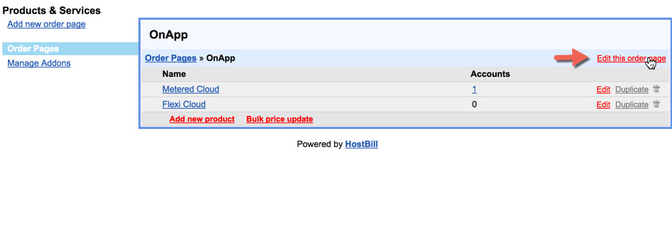
- In HostBill, proceed to "Settings->Products & Services"
- Select existing Order Page, or create new one
- Click on "Edit this Order Page"
- Click on uploaded orderpage to activate/select it
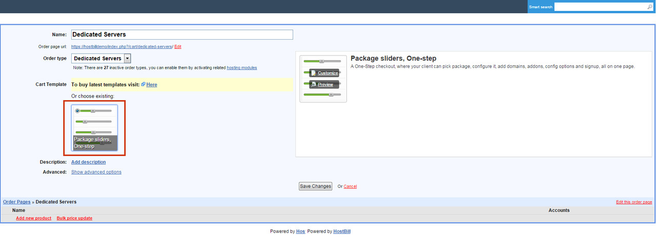
This orderpage offers some customization you can do from admin panel.
Areas available to modify:.png?version=1&modificationDate=1427117979070&cacheVersion=1&api=v2&width=405&height=400)
To modify editable areas, click on "Customize", enter your custom texts:
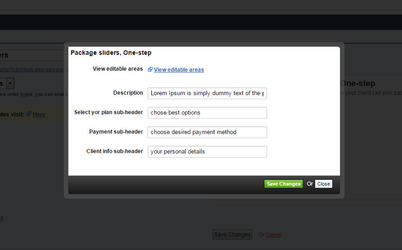
- Save changes to save orderpage settings.
You can now edit your products under this orderpage, following product description setup:
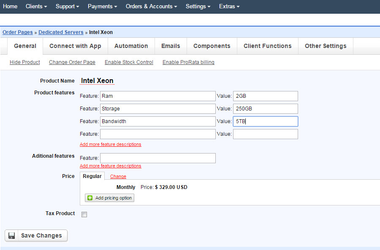
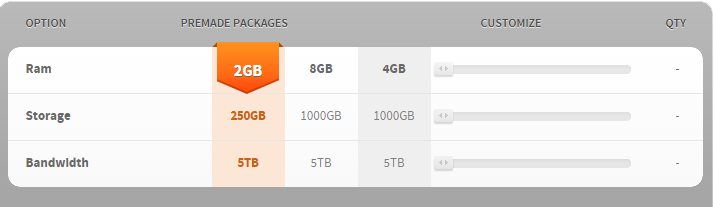
Will result in following order page layout:
, multiple selections available,
Related content
Premade Sliders, One-step
Premade Sliders, One-step
More like this
Gauge Sliders, One-step
Gauge Sliders, One-step
More like this
Circular Slider, One Step
Circular Slider, One Step
More like this
Price-Slide, One-step
Price-Slide, One-step
More like this
Cloud Slider, One-Step orderpage
Cloud Slider, One-Step orderpage
More like this
Volume Slider, One Step Orderpage
Volume Slider, One Step Orderpage
More like this